
Screenshots


Introduction
Welcome to the world of knowledge at your fingertips with the Wikipedia Beta app for Android! Developed by the Wikimedia Foundation, this beta version allows users to explore and experience new features before they are officially released in the standard Wikipedia app. This app runs alongside the regular Wikipedia app, enabling users to provide valuable feedback to improve functionality and user experience. With a commitment to open-source development, the app encourages contributions from developers and users alike. If you're a knowledge seeker who enjoys staying updated with the latest content and features, this beta app is a must-try!
Graphics & Gameplay
The visuals of the Wikipedia Beta app are designed to enhance the user experience while maintaining the simplicity and elegance associated with Wikipedia. The screenshots reveal a clean, user-friendly interface that is easy to navigate. The home screen features a dynamic explore feed showcasing recommended articles, current events, and historical milestones. Users can customize their feed preferences, which is visually appealing with a variety of content types displayed in a neatly organized layout.
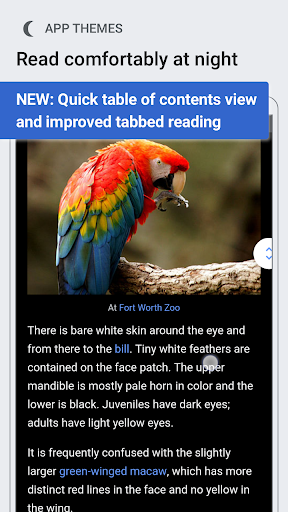
The app also offers a selection of color themes, including Light, Dark, and Black, catering to different user preferences and lighting conditions. This flexibility not only enhances readability but also makes the app visually adaptable to various environments. The image gallery feature allows users to view high-resolution images seamlessly, adding a rich visual context to the articles. Overall, the graphics are well-executed, ensuring a pleasant and engaging reading experience.
Key Features
- Explore Feed: A constantly-updating feed on the home screen presents trending articles, current events, and suggested readings, which can be customized based on user preferences.
- Color Themes: Users can select from Light, Dark, and Black themes, along with text size adjustments for a personalized reading experience.
- Voice-Integrated Search: The app features a prominent search bar with voice-enabled search capability, making it easy to find information quickly.
- Language Support: Switch between various language-supported Wikipedia articles, enhancing accessibility and usability for a global audience.
- Link Previews: Users can preview articles without losing their current reading position, making it easier to explore related content.
- Table of Contents: A swiping feature allows quick access to different sections of an article, improving navigation.
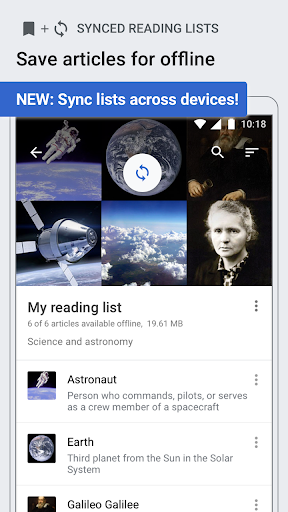
- Reading Lists: Organize articles into custom reading lists that can be accessed offline, allowing for effective content management.
- Image Gallery: High-resolution image viewing enhances the visual experience, enabling users to swipe through additional images.
- Definitions from Wiktionary: A tap-and-hold feature allows users to quickly define words, enhancing comprehension and learning.
- Map Markers: Articles can be viewed as markers on a map, providing geographical context to the content.
Mod Features
- Premium Unlocked: Enjoy exclusive features that enhance the overall functionality of the app, providing users with advanced customization options.
- No Ads: Experience an uninterrupted reading journey with the removal of all advertisements, allowing for a smoother user experience.
- Unlimited Money: Access premium features and content without any limitations, empowering users to explore all aspects of the app freely.
- Enhanced Themes: Unlock additional color themes and customization options that go beyond the standard offerings, catering to individual tastes.
- Offline Reading Boost: Download articles for offline reading without restrictions, ensuring access to information anytime, anywhere.
How to Install APK on Android
Installing the Wikipedia Beta APK is straightforward and can be done in a few simple steps:
- Enable Unknown Sources: Go to your device's Settings, navigate to Security, and enable the option to install apps from unknown sources.
- Download the APK: Click on the download link provided below to obtain the Wikipedia Beta APK file.
- Open the APK: Locate the downloaded APK file in your device's file manager and tap on it to start the installation process.
- Follow Installation Prompts: Follow the on-screen instructions to complete the installation. Once finished, the app will be available on your home screen.
- Launch the App: Open the Wikipedia Beta app and start exploring the new features and content!
Download Wikipedia Beta
If you're ready to dive into the latest features of Wikipedia and help shape the future of the app, click the link below to download Wikipedia Beta for Android:
With its innovative features and user-friendly design, Wikipedia Beta is an excellent tool for anyone looking to expand their knowledge and stay informed. Don’t miss out on the opportunity to be part of the app’s development and contribute your feedback!