
Screenshots


Introduction
Voice GPS Navigation: GPS Map, developed by Handy Tools Studio, is a robust navigation application designed to make your journey seamless and efficient. With its intuitive interface and advanced voice navigation capabilities, this app serves as an essential travel companion for drivers, walkers, and public transit users alike. Offering detailed route guidance, turn-by-turn voice directions, and real-time updates, it aims to simplify the navigation experience, making it feel almost magical. Whether you are looking for the quickest route to your destination or exploring new areas, Voice GPS Navigation ensures you stay on the right path.
Graphics & Gameplay
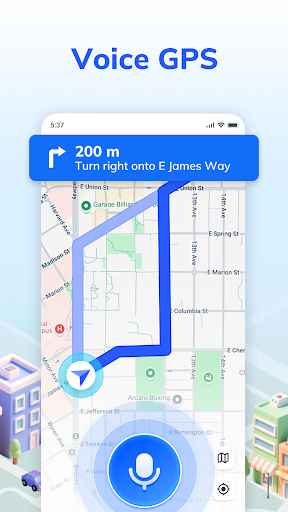
The visual experience of Voice GPS Navigation is both appealing and functional. The app features a clean and user-friendly interface, which is evident in the graphics showcased in the screenshots. The main screen presents a detailed map view, seamlessly blending vibrant colors and clear icons for easy recognition of routes and landmarks. Users can see their current location marked prominently, along with the chosen route highlighted for clarity.
Screenshots depict various perspectives, including satellite views that enhance the navigation experience by providing an aerial view of the surroundings. The app also features a speedometer integrated into the navigation bar, allowing users to monitor their driving speed without switching screens. Overall, the graphics are designed to enhance usability while providing an aesthetically pleasing experience that keeps users engaged and informed throughout their journey.
Key Features
- Voice Navigation: The app supports hands-free operation, allowing users to issue voice commands for navigation. This feature enhances safety and convenience, enabling drivers to focus on the road.
- Multiple Route Options: Users can choose the most suitable route based on their preferences—whether it be the fastest, safest, or most economical. Real-time updates ensure that you can adapt to changing conditions like traffic or weather.
- Nearby Places Finder: The app can help users locate nearby amenities such as gas stations, restaurants, and restrooms, making it an excellent tool for travelers in unfamiliar areas.
- Satellite Maps: Users can switch to satellite view for a different perspective on their surroundings, adding depth to their navigation experience.
- Speedometer: A built-in speedometer provides real-time speed updates, helping users stay within legal limits while navigating.
Mod Features
- Premium Unlocked: Enjoy all premium features without any in-app purchases, enhancing your navigation experience with no limitations.
- No Ads: Navigate without interruptions from advertisements, ensuring a smooth and focused experience while driving or exploring.
- Unlimited Money: Access unlimited resources for any premium upgrades, allowing you to customize your experience without worry.
- Offline Maps: Download maps for offline use, making it easier to navigate in areas with poor connectivity or when traveling abroad.
How to Install APK on Android
Installing the Voice GPS Navigation APK on your Android device is a straightforward process. Follow these steps to get started:
- Go to your device's Settings and enable 'Install from Unknown Sources' to allow installations from sources other than the Google Play Store.
- Download the APK file from a trusted source, such as the link provided at the end of this guide.
- Once the download is complete, navigate to your device's Downloads folder and locate the APK file.
- Tap on the APK file to initiate the installation process. Follow the on-screen prompts to complete the installation.
- After installation, open the app, grant the required permissions, and start navigating!
Call to Action
If you're ready to experience the convenience of voice-guided navigation and all the features offered by Voice GPS Navigation: GPS Map, don't hesitate to download it now! Click here to get started on your journey with this fantastic navigation app.