
Vivisticker: Your Ultimate Aesthetic Toolkit for Stories, Videos & More
Screenshots


Introduction
Vivisticker is a content creation app developed by Printage, Inc., designed to elevate your aesthetic game across social media platforms. Whether you’re crafting Instagram Stories, TikToks, or engaging video content, Vivisticker equips you with high-quality assets to enhance your creations. With its user-friendly interface and advanced editing tools, it caters to both seasoned creators and novices alike, making aesthetic design accessible to everyone.
Graphics & Gameplay
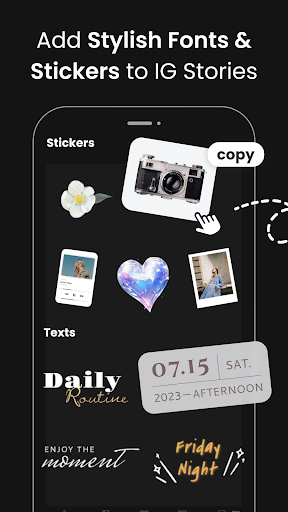
The visuals of Vivisticker are vibrant and engaging, demonstrating a modern design aesthetic that appeals to a wide range of users. The app's interface features a clean layout, allowing for easy navigation through its diverse functionalities. Screenshots from the app showcase a plethora of aesthetic stickers, including hand-drawn illustrations, film frames, and lifestyle objects that can be seamlessly integrated into various projects. Users can expect to find beautifully designed text effects that support multiple styles, such as 3D, outline, hollow, and curved formats, all of which contribute to the polished look of any project.
In addition to stickers and text effects, Vivisticker offers a curated GIF library, making it easy for users to find trending visuals to complement their content. The ease of copying and pasting assets across different apps is highlighted in the gameplay, ensuring that content creators can quickly and efficiently enhance their work without the hassle of complex workflows.
Key Features
- Aesthetic Stickers: With over 1,000 unique stickers, users have access to an extensive library of hand-drawn illustrations and themed objects that can add flair to any creation.
- Text Effects and Layout Tools: The app boasts a variety of text styles, customizable spacing, and layout options that help users achieve a professional look effortlessly.
- AI Editing Tools: Vivisticker comes equipped with cutting-edge AI features that allow for background removal, photo retouching, and stylization in mere seconds.
- Easy Video Editing: Users can create stylish videos with pre-designed templates that include animated text, frames, and more, making video editing accessible to everyone.
- Photo Editing Made Simple: The app provides beginner-friendly tools for photo editing, including popular filters and one-tap HD photo repair, ensuring your images look their best.
- Personalized Assets: Users can create unique phone wallpapers and AI-generated stickers from their own photos, adding a personal touch to their content.
- Cross-Device Compatibility: Vivisticker allows users to log in from multiple devices, ensuring that your creative process is seamless and uninterrupted.
- Step-by-Step Tutorials: The app includes over 100 tutorials to guide users through various features and techniques, making it easy for anyone to start creating stunning content from day one.
Mod Features
- Premium Unlocked: Enjoy all the app's features without restrictions, allowing you to access exclusive stickers, templates, and editing tools.
- No Ads: Experience uninterrupted creativity with an ad-free interface, letting you focus on your content without distractions.
- Unlimited Assets: Gain access to an infinite number of stickers, GIFs, and templates, ensuring you never run out of creative options.
- Customizable Templates: Unlock advanced customization options for templates, allowing you to create truly unique content that stands out.
How to Install APK on Android
Installing the Vivisticker APK on your Android device is a straightforward process. Follow these steps:
- Download the APK: Visit the official link provided to download the Vivisticker APK file.
- Enable Unknown Sources: Go to your device's Settings > Security, and enable the "Install from Unknown Sources" option to allow installation from sources outside the Google Play Store.
- Locate the APK File: Use a file manager app to navigate to your downloads folder and locate the Vivisticker APK file.
- Install the APK: Tap on the APK file to begin the installation process. Follow the on-screen prompts to complete the installation.
- Open Vivisticker: Once installed, you can find Vivisticker in your app drawer. Tap to open and start creating!
Call to Action
If you're looking to enhance your content creation process and produce stunning visuals without the need for extensive design skills, Vivisticker is the app for you. Download it now and embark on your aesthetic content journey!