
Screenshots
Introduction
Timesheet - Work Hours Tracker is an innovative application designed to streamline the process of tracking work hours and maintaining a comprehensive work log. Developed by aadhk, this app caters to a diverse audience, including self-employed individuals, freelancers, contractors, hourly workers, and employees who need to monitor their working hours effectively. With its user-friendly interface and robust features, Timesheet not only calculates earnings but also allows users to submit timesheets to managers or invoices to clients with ease. The app is available for download at this link.
Graphics & Gameplay
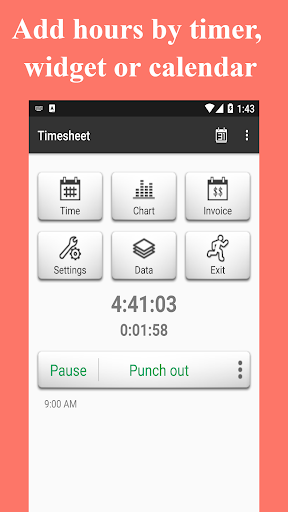
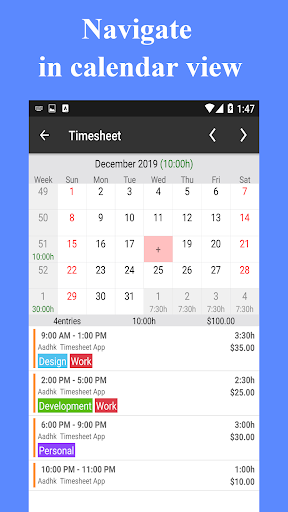
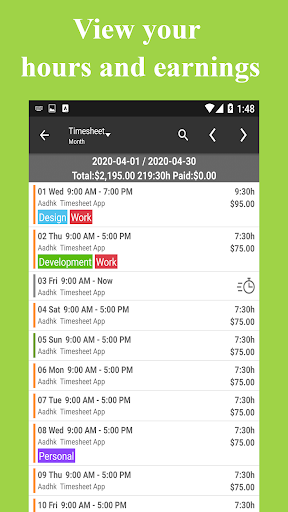
The visual presentation of Timesheet is clean and intuitive, making navigation a breeze for users of all experience levels. The screenshots reveal a well-organized layout, featuring a dashboard that displays key metrics such as total hours worked and earnings. The calendar view allows users to easily navigate through their work hours, providing a visual representation of their time management. Additionally, the app incorporates various graphical elements, such as charts for analyzing work hours, which enhance the user experience by providing insights at a glance. The overall aesthetic is modern, with a professional color palette that is visually appealing and minimizes distractions.
Key Features
- Multiple Input Methods: Users can log work hours through a timer, widget, or calendar, offering flexibility based on personal preferences.
- Calendar Navigation: A user-friendly calendar view allows for easy visualization and management of work hours.
- Earnings Tracking: The app automatically calculates salary based on logged hours, ensuring accurate financial tracking.
- Multiple Job Support: Users can track hours and earnings across various jobs and clients, making it ideal for freelancers and contractors.
- Overtime Calculations: The app automatically calculates daily, weekly, and monthly overtime, ensuring users are compensated fairly for extra work.
- Time Rounding: Users can round time entries to the nearest 3, 5, 10, 15, 30, or 60 minutes for simplicity.
- Custom Pay Periods: Supports various pay periods including monthly, semi-monthly, bi-weekly, and weekly.
- Expense Tracking: Users can log tax deductions, expenses, and mileage, providing a comprehensive financial overview.
- Tags for Organization: Organize work hours by tags to easily categorize and retrieve data.
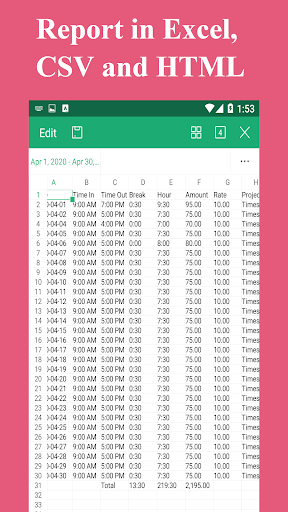
- Data Export: Share timesheets in Excel, CSV, and HTML formats, or send client invoices in PDF format, facilitating easy reporting and billing.
Mod Features
While the standard version of Timesheet offers a plethora of features, a modded version could potentially enhance the user experience further. Here are some creative ideas for plausible mod features:
- Premium Unlocked: Access all premium features without any cost, providing a fully functional experience from the start.
- No Ads: Enjoy an uninterrupted experience by eliminating all advertisements, allowing users to focus solely on work tracking.
- Unlimited Money: Users can unlock premium features and functionalities without restrictions, making it easier to manage work-related finances.
- Custom Themes: Personalize the app with various themes and color options, allowing users to tailor their experience to their preferences.
- Advanced Analytics: Gain deeper insights into work patterns and earning trends with enhanced analytics tools, helping users make more informed decisions.
How to Install APK on Android
Installing the Timesheet APK on your Android device is a straightforward process. Follow these steps to get started:
- Download the APK: Visit the provided link (download Timesheet APK) and download the file to your device.
- Enable Unknown Sources: Go to your device's settings, navigate to Security, and enable the "Unknown Sources" option to allow installations from sources other than the Google Play Store.
- Locate the APK File: Use a file manager app to find the downloaded APK file in your device's download folder.
- Install the APK: Tap on the APK file and follow the on-screen instructions to install the app on your device.
- Open the App: Once the installation is complete, open Timesheet from your app drawer and start tracking your work hours!
Conclusion
Timesheet - Work Hours Tracker is a powerful tool for anyone needing to manage their work hours and earnings effectively. With its robust features, user-friendly interface, and versatility for various professions, it stands out as an essential app for freelancers, contractors, and hourly workers alike. By following the installation guide above, you can easily download and start using Timesheet today. Don't miss out on the opportunity to take control of your work hours and finances—download Timesheet now!