
Screenshots

Introduction
The Division 2 Companion App is a dedicated tool for players of the popular online action RPG, Tom Clancy's The Division 2. Developed by Active Developers, this app serves as an essential companion for agents looking to enhance their gameplay experience. Currently at version 0.22, the app focuses on providing players with up-to-date weekly vendor reset information, as well as comprehensive details about weapons, gear, gear sets, and talents in line with the Warlords of New York expansion. Although it is still in its initial stages, the developer has plans for future updates that will expand its features and information.
Graphics & Gameplay
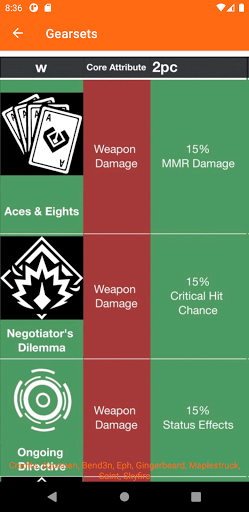
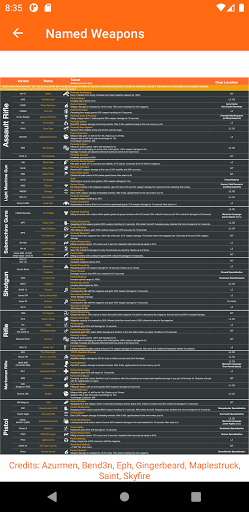
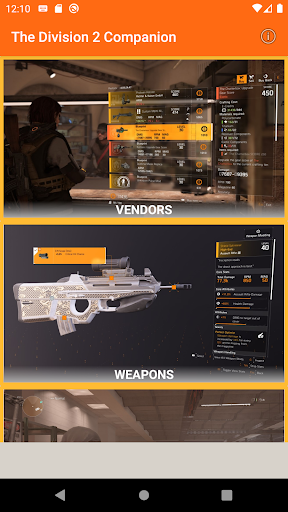
The visual design of The Division 2 Companion App is straightforward and user-friendly, making navigation seamless for players. The app features a modern aesthetic, with a dark theme that resonates well with the game's gritty atmosphere. The screenshots showcase a clean layout that allows users to easily access vendor information, weapon statistics, and gear details without any clutter. Each section is well-organized, featuring icons and textual descriptions that enhance the user experience. The app's graphics are not overly flashy, prioritizing functionality over form, which is crucial for players who need quick and reliable information while playing.
Key Features
- Weekly Vendor Reset Information: Stay updated with the latest gear and weapons available from vendors in the game. This feature is particularly valuable for players looking to optimize their loadouts and gather the best equipment.
- Comprehensive Weapon Stats: The app provides detailed information about various weapons, including damage range, rounds per minute (RPM), reload speed, and damage per second (DPS). These insights are gathered from community sources, ensuring that players have access to relevant and accurate data.
- Gears and Gear Sets: Players can access detailed descriptions of different gear items and sets, each with its unique attributes and bonuses, allowing for informed decisions on gear selection.
- Talents Overview: The app includes information about various talents available in the game, helping players strategize and build their characters effectively.
- Feedback Mechanism: Users can report bugs or provide suggestions directly through a Twitter link embedded within the app, fostering a sense of community and continuous improvement.
- Future Updates: The developer is committed to expanding the app’s functionality and information based on player feedback and game updates, ensuring that the app remains relevant and useful.
Mod Features
While the official version of The Division 2 Companion App provides a wealth of information, hypothetical mod features could enhance the user experience even further. Here are some creative mod features that could be beneficial:
- Premium Unlocked: Access all features of the app without any restrictions, including exclusive tips and strategies for maximizing gameplay.
- No Ads: Enjoy an uninterrupted experience without intrusive advertisements, allowing for a seamless flow of information as you play.
- Unlimited Money: Although the app does not involve in-game currency, having access to unlimited resources for managing gear and upgrades could be a hypothetical feature for players who prefer an enhanced experience.
- Customizable Interface: Personalize the app's appearance with themes and layouts that suit individual preferences, making it even more user-friendly.
- Advanced Analytics: Gain insights into player performance and gear effectiveness, helping to refine strategies and improve overall gameplay.
How to Install APK on Android
Installing The Division 2 Companion App on your Android device is a straightforward process. Follow these steps to get started:
- Step 1: Ensure that your Android device allows installations from unknown sources. You can do this by navigating to Settings > Security > Unknown Sources and enabling it.
- Step 2: Download the APK file from a trusted source. You can find it through the official link provided in the app description.
- Step 3: Locate the downloaded APK file in your device's file manager and tap on it to initiate the installation process.
- Step 4: Follow the on-screen prompts to complete the installation. Once done, you can find the app icon on your home screen or app drawer.
- Step 5: Launch the app and begin exploring the features available to enhance your gameplay in The Division 2!
If you're a dedicated player of Tom Clancy's The Division 2, this companion app is a must-have tool. Its focus on vendor resets and weapon statistics can significantly enhance your in-game experience. With plans for future updates, the app is positioned to grow into an even more essential resource for agents everywhere.
Download The Division 2 Companion App
Ready to take your gameplay to the next level? Download The Division 2 Companion App now and make your journey through Washington D.C. more efficient and enjoyable. Download Here