
Screenshots


Introduction
MusIt - Music Player is a versatile application designed for Android users who seek a seamless music and video playback experience. Developed by VSD Dev, this app stands out with its ability to manage a comprehensive media library, allowing users to play their favorite songs and videos smoothly while offering organizational tools like playlists, favorites, and recently played items. With its multifunctional capabilities, MusIt combines the features of a music player with a video player, making it an excellent choice for users who appreciate having their media organized and easily accessible.
Graphics & Gameplay
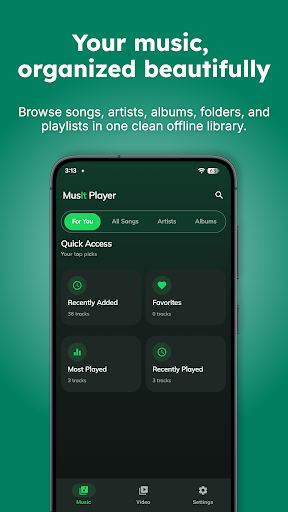
The visuals of the MusIt app are aesthetically pleasing and user-friendly. The interface is designed to be intuitive, with a clean layout that emphasizes ease of navigation. The screenshots showcase a modern design, featuring vibrant album art and well-structured playlists that enhance the user experience. The app's color themes—light, dark, and AMOLED—offer users the flexibility to choose a style that suits their preferences. The navigation bar is easily accessible, allowing for quick movement between different sections like music, videos, and media libraries. Overall, MusIt provides a visually appealing environment that enhances the enjoyment of media playback.
Key Features
- Comprehensive Media Library: MusIt allows users to browse songs and videos, search files, and manage media by folders and collections, making it easy to find and organize content.
- Playlist Management: Users can create custom playlists and save favorite music and videos for easy access, ensuring that their preferred media is always at their fingertips.
- Resume Playback: The app supports the resume feature, enabling users to continue from where they left off in their media.
- Private Safe: MusIt offers a security feature that allows users to protect selected music and videos with a PIN or biometric unlock options, ensuring privacy and security.
- Trash Management: Users can restore deleted items or permanently remove them when needed, providing flexibility in media management.
- Subtitle Tools: For video playback, MusIt supports subtitle tracks, local subtitles, and customization options for subtitle appearance and sync adjustments.
- Audio Controls: The app features equalizer controls to enhance the listening experience, alongside the ability to switch audio tracks in supported videos.
- Video Playback Tools: Users can take advantage of tools like playback speed adjustment, background play, A-B repeat, mirror mode, and more.
- Playback Gestures: Intuitive gestures such as double-tap seeking and hold controls enhance video navigation.
- Theme Options: Users can choose from various themes, including Light, Dark, and AMOLED, allowing for a personalized experience.
Mod Features
- Premium Unlocked: Gain access to all premium features without any cost, enhancing the overall functionality of the app.
- No Ads: Enjoy an uninterrupted experience with no ads disrupting your music or video playback.
- Unlimited Money: In a hypothetical scenario, users could enjoy unlimited credits for purchasing premium themes or features within the app.
- Enhanced Audio Quality: Experience improved sound output with advanced audio enhancement options exclusive to mod users.
- Exclusive Themes: Access additional unique themes that are not available in the standard version, allowing for further customization.
How to Install APK on Android
Installing the MusIt APK on your Android device is simple. Follow these steps to get started:
- Enable Unknown Sources: Go to your device's Settings, then navigate to Security. Enable the option to install apps from unknown sources.
- Download the APK: Visit the MusIt download link: here. Tap on the download button to get the APK file.
- Locate the APK: Once the download is complete, open your device's File Manager and navigate to the Downloads folder to find the MusIt APK file.
- Install the APK: Tap on the APK file, and follow the on-screen instructions to complete the installation process.
- Open the App: Once installed, you can find the MusIt app in your app drawer. Tap to open and start enjoying your music and videos!
Conclusion
MusIt - Music Player is a robust application that serves as a one-stop solution for all your music and video playback needs. With its impressive array of features, user-friendly interface, and customizable options, it stands out in the crowded media player app market. Whether you are a casual listener or a media enthusiast, MusIt offers everything you need to enjoy your favorite songs and videos efficiently. Don't miss out on this opportunity to elevate your media experience—download MusIt today!
Ready to enhance your media experience? Download MusIt - Music Player here!