
Calculation Training: A Comprehensive Review and Download Guide
Screenshots



Introduction
Calculation Training is a brain-training app designed by JoyPlot, aimed at individuals of all ages, from elementary school children to seniors. With its simple, engaging interface and a diverse array of math problems, this app serves as an excellent tool for sharpening mental math skills anytime, anywhere. Version 1.7.4 of Calculation Training eliminates extraneous features, allowing users to focus solely on practicing mental calculations. Whether you are looking for elementary math practice, a quick cognitive warm-up before diving into more complex studies, or a means to maintain your mental acuity as you age, this app is an ideal companion.
Graphics & Gameplay
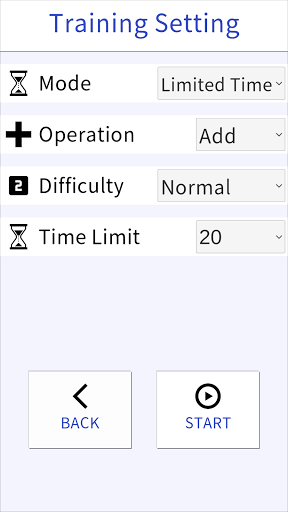
Upon opening the Calculation Training app, users are greeted with a clean and intuitive interface. The app's design is minimalistic, emphasizing the mathematical problems rather than overwhelming users with unnecessary decorations. The screen showcases a straightforward layout where users can select their desired mode and difficulty level with ease.
The gameplay is smooth and responsive, with bright colors highlighting the buttons and options available. Users will find it easy to navigate through different arithmetic operations, and the keypad layouts for entering answers are user-friendly, catering to various preferences. The app includes visual feedback for correct and incorrect answers, enhancing the overall experience. Screenshots showcase vibrant graphics that are both appealing and functional, ensuring an engaging training environment.
Key Features
- Customizable Calculation Training: Users can practice four basic arithmetic operations: Addition, Subtraction, Division, and Multiplication. Options for Mixed Arithmetic and Expressions with Two Operators allow for a comprehensive training experience.
- Select Your Difficulty Level: The app offers five difficulty levels, from Easy to Very Hard, enabling users to select a level that suits their abilities and gradually improve their skills.
- Multiple Training Modes: Three distinct modes are available:
- Time Limit Mode: Solve as many problems as possible within a customizable time frame (20 to 300 seconds).
- Question Limit Mode: Tackle a fixed number of problems (10 to 300) as quickly as possible.
- Endless Mode: Keep answering correctly to extend the time limit and achieve higher scores.
- Flexible Input Options: Users can set their preferences for entering multi-digit answers and choose between different keypad layouts for optimal comfort.
- Online Rankings: The app integrates with Google Play Games, allowing users to compete globally and track their scores against others.
Mod Features
While the base version of Calculation Training offers a satisfying experience, some users may desire additional enhancements. Here are some plausible mod features that could elevate your gameplay:
- Premium Unlocked: Gain access to exclusive training modes and difficulty levels without any restrictions, allowing for a more customized experience.
- No Ads: Enjoy an uninterrupted training session by removing all advertisements from the app.
- Unlimited Money: Use unlimited in-game currency to unlock premium features and enhancements, making your training both efficient and enjoyable.
- Advanced Analytics: Access detailed analytics on your performance, including strengths and weaknesses, to further tailor your training regimen.
How to Install APK on Android
Installing the Calculation Training APK on your Android device is a straightforward process. Follow these steps to get started:
- Enable Unknown Sources: Go to your device's settings, navigate to Security, and enable the "Install from Unknown Sources" option. This allows you to install apps not downloaded from the Google Play Store.
- Download the APK File: Click on the following link to download the Calculation Training APK: Download Calculation Training APK.
- Locate the APK File: Use a file manager app to find the downloaded APK file in your device's Downloads folder.
- Install the APK: Tap on the APK file and follow the on-screen instructions to install Calculation Training on your device.
- Open and Enjoy: Once installed, open the app from your app drawer, and start training your calculation skills!
Conclusion
Calculation Training by JoyPlot is an exceptional app for anyone looking to enhance their mental arithmetic skills. With its user-friendly design, customizable training options, and engaging gameplay, it is suitable for all ages and skill levels. Whether you are preparing for exams, warming up your brain, or simply seeking to keep your mind sharp, this app provides a valuable resource for cognitive growth. Don’t miss out on the opportunity to improve your mental math skills!
Ready to sharpen your calculation skills? Download Calculation Training now by clicking the link: Download Calculation Training APK.